
QRCodeVersion 1.0.0
Create QR Code Payment
https://pay.globepay.co/api/v1.0/gateway/partners/{partner_code}/orders/{order_id}QR Code Payment is used for webpage/application on PC. Customers use WeChat or Alipay app to scan QR Code generated when creating order and finish the payment.
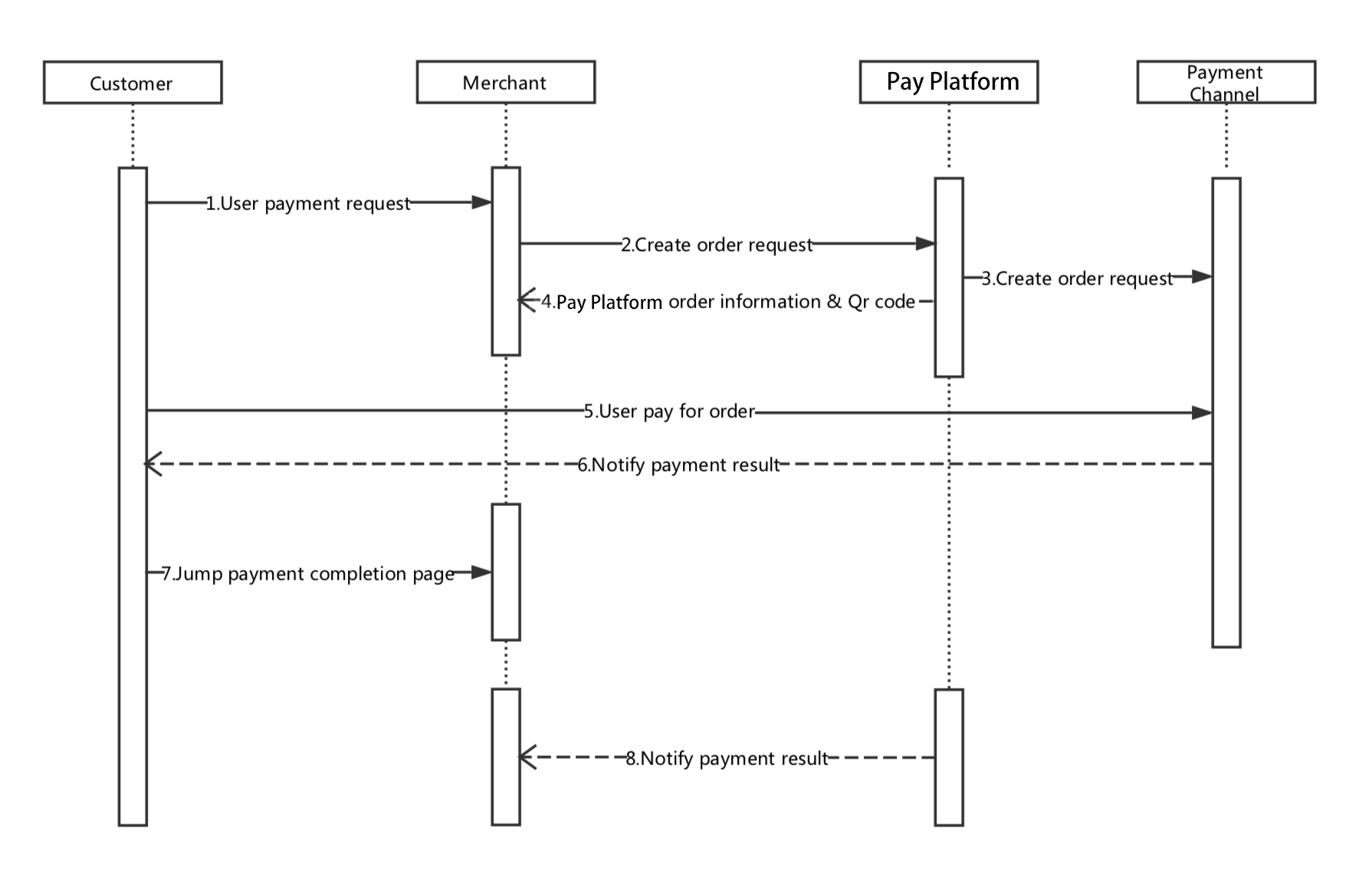
Return value contains QR Code string, QR Ccode image and payment page address. Partners can decide how to finish the payment. If the currency is CNY, equivalent GBP amount shall never less than 0.01 GBP, otherwise user will get Invalid Amount Error from WeChat when making the payment.
Header
| Field | Description |
|---|---|
Accept | application/json |
Content-Type | application/json |
Path Variable
| Field | Type | Description |
|---|---|---|
partner_code | String | Required, Partner Code |
order_id | String | Required, Partner order id. Shall be unique for the same partner. If repeated, order will be recognized as an existing order. |
JSON keys
| Field | Type | Description |
|---|---|---|
description | String | Required, Description of an order. |
price | int | Required, Price of the order. Use the base unit of the currency. |
currency | String | Currency |
channel | String | Payment channel, case sensitive |
notify_url | String | System will call the notify url if provided when the payment succeeds |
operator | String | Note for the operator who created this order. |
Query Params
| Field | Type | Description |
|---|---|---|
time | Long | Required, UTC timestamp in milliseconds |
nonce_str | String | Required, Random string |
sign | String | Required, Sign |
Success 200
| Field | Type | Description |
|---|---|---|
return_code | String | Execution result |
result_code | String | SUCCESS means order created successfully, EXISTS means order has already existed. |
channel | String | Payment channel |
partner_code | String | Partner code |
full_name | String | Partner's full company name when registered |
partner_name | String | Partner's name |
order_id | String | Order id in GlobePay, which is also WeChat order id. The final order id which is paid may be different from this one. |
partner_order_id | String | Partner order id |
code_url | String | QR Code string. Partners can create the payment QR Code according to this value. |
qrcode_img | String | QR Code image formatted in Base64. Can be used as the src attribute on img element |
pay_url | String | Payment page in GlobePay |
Error Code
| Name | Description |
|---|---|
ORDER_MISMATCH | Order is not belong to this partner. |
ORDER_PAID | Order has already been paid |
SYSTEMERROR | Exception inside system |
INVALID_SHORT_ID | Partner code is invalid or there is no partner associated with this code |
SIGN_TIMEOUT | Sign expired, the difference between time and the server time is more than 5 minutes |
INVALID_SIGN | Invalid sign |
PARAM_INVALID | Parameters are invalid. See return_msg for more details. |
NOT_PERMITTED | Gateway payment permission has not been enabled for this partner |
INVALID_CHANNEL | Channel name is not available, check the Capitalize |
ERROR
| Name | Description |
|---|---|
return_code | Error Code |
return_msg | Error Description |