
GlobePay Gateway Payment API1.1.0
Overview
GlobePay Gateway Payment API for Third-Party Developers
Domain
Production Environment
Request And Parameters
Request for payment or refund shall use PUT method. Request for querying order shall use GET method. All requests including Request Entity are in JSON format.
Accept in the request header shall be set to application/json for all requests except redirect pages. Content-Type in the request header shall be set to application/json for all PUT/POST requests.
System charset is UTF-8.
There are 3 groups of parameters: Path Variable, Query Param, JSON Entity
- Path Variable: included in the path as patterns
- Query Param: parameters after the URI '?' symbol and formatted like key=value
- JSON Entity: only used in PUT/POST requests
Our API server will return 200 in JSON if the request has successfully reached the server, which does not indicate the success or failure of the actual operation. All responses in JSON format will include a return_code field which contains the operation result. The value SUCCESS indicates that the operation was successful while other values shows the type of error that happened. Response will also contain a return_msg field for detailed error message.
Multi-Language
System error message supports Simplified Chinese and English. The system by default will automatically choose the language according to the Accept-Language value in request header. Cookie "locale" value (zh-CN or en-US) will affect the result language.
Which Gateway Api is for me?
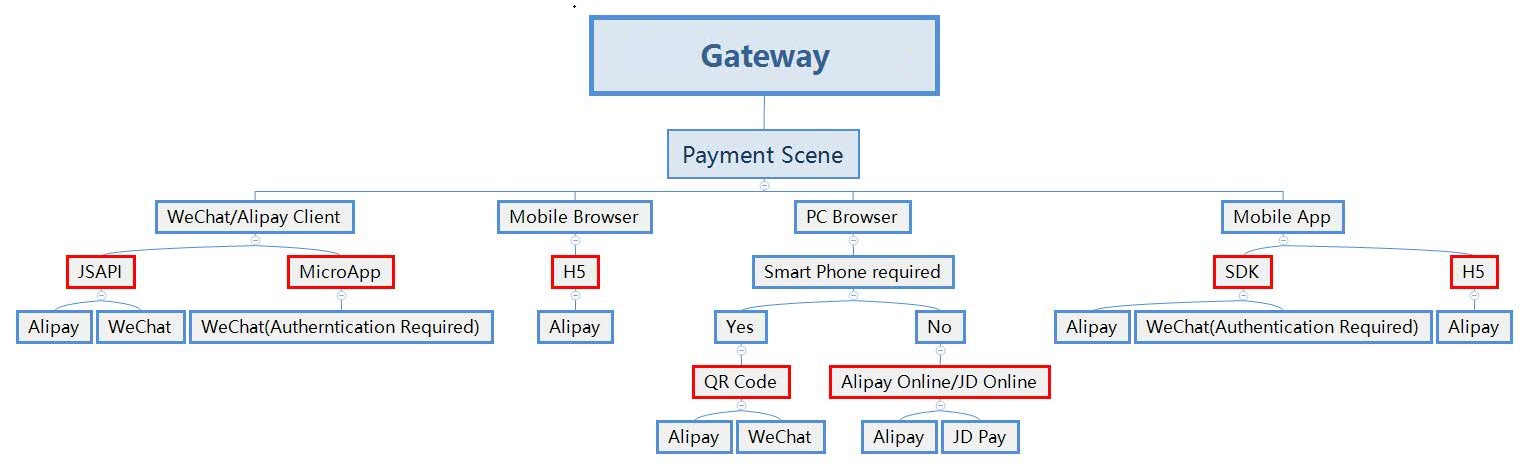
Alipay Channels
According to different Api used, Alipay channel was distributed to Retail channel and Online channel. Two channels has different exchange rate and surcharge rate.
- Online Channel: Including H5 Mobile, Online Payment and APP SDK(coming soon)
- Retail Channel: Including JSAPI, QR Code Api, Retail Pay
Difference
- JSAPI and H5 Mobile: JSAPI can only be called in the web page opened in Alipay Client. H5 Mobile can call the payment panel in any browser or webview in App in the mobile device.
- Online Payment and QR Code: Online payment will jump to Alipay Official payment page. Customers can scan QR Code displayed in the page or sign in their account directly to finish payment. QR Code can provide a QR Code. Merchants can display this QR Code in their web page or jump to GlobePay to display the QR Code. Customers can only scan the QR Code with their Alipay Client to finish payment.
Sign Algorithm
Sign messages are required in each request for validation. Sign parameters are all attached to URL as query params, and the order is irrelevant.
Sign Program:
- Connect 4 parameters with '&' symbol into an original valid string. Escape value is not required.
valid_string=partner_code&time&nonce_str&credential_code
Parameters:
- partner_code: Code for partner, including four to six uppercase letters or numbers.(Please check the email when complianced by GlobePay; Or you can login the Manage System to check, "Configuration——Client Detail——Merchant Basic Info——Partner Code")
- time: UTC timestamp in milliseconds. Take current timestamp of UTC. Data type is Long. The difference between time and GlobePay server time should be less than 5 minutes.
- nonce_str: Random string. No limit for length. URL-Safe characters are required. The proposed length is 10-30 characters.
- credential_code: Partner credential code for development provided by GlobePay system. Keep it safe and never disclose it to the public. If compromised, contact us to change it.Partner credential code for development provided by GlobePay system. Keep it safe and never disclose it to the public. If compromised, contact us to change it.(Please check the email when complianced by Globepay to find it or log in to Management System click to Configuration——Client Detail——Payment Info——Gateway Credential)
- Sign the valid string with SHA256 and turn to lowercase Hex string
sign=hex(sha256(valid_string)).toLowerCase()
- Include the time,nonce_str and sign into Query Param when calling api.
Example
valid_string=RPAY&1468691301081&aaf2a94c8c2d56d5b43a1a3d9d811102&pQ5Jc9eoTcsxqPY5uQ3p2WmvSy0zEYeP sign=64712672795f94fa3bfb2e88ac09cb75d09bcf8a3c3dcaa529d8290dd6587060
Test Page:https://pay.globepay.co/sign_test.html
Currency Codes
GlobePay can only accept the following currencies at the moment. Please note that the settlement currency will always be Great Britain Pound.
- GBP
- CNY
Business Roles
- QR Code Payment displays a QR code image in a web page. Customers will scan the code via their WeChat and complete the payment in the linked web page. It is suitable for online shopping websites.
- JSAPI Payment redirects customers to a web page in WeChat. This page can only be opened within WeChat app and it is suitable for payment from micro-shops on WeChat platform.
- Retail passive payment(Scan Payment Code in customers’ WeChat Wallet) and active payment(Generate Payment QR Code for customers to scan) are used in retail environment such as payment terminals and pos machines.
- Order ID is required when creating an order. The same order id cannot be sent again. The system will decide to renew an order or close the old order according to the order status. System will recognise the same order id to avoid duplicated payments from customers.
- As orders can be resubmitted, Order ID returned by our server might not represent the last Order ID paid.
- QR Code order creation will return QR Code and pay_url. Merchants may decide whether to display the QR code on their website or to redirect customer to the payment page available at pay_url.
- JSAPI order creation will return pay_url. Merchants shall redirect customer to the payment page available at pay_url, and complete the payment.
- When redirecting to pay_url, sign information is required.
- Each request shall use new timestamp, nonce_str and sign.
- Our system will notify the caller after an order is paid successfully if notify_url was provided when creating an order. Otherwise, Merchants shall call the order query method repeatedly until order is paid or closed.
- Each unpaid order will be valid for 5 minutes. Expired order can be renewed with same the order id. It is suggested to trigger the event when user open the payment page again.